SaaS – what is it? What is Software as a Service?

A Shopify store, a newsletter sent from an email marketing platform, invoices issued in a web browser. These tools have one thing in common. You don't install them on your own computer or server. You use them online and pay for access, not for a boxed license.
This model has a name: SaaS. What is it, and why do so many companies and online stores rely on it every day?
In this article, we explain what Software as a Service (SaaS) is, how it works under the hood and how it's billed. We compare SaaS with the PaaS and IaaS models and with software installed on-premise. We also cover its advantages, limitations and examples.
What is SaaS?
Software as a Service (SaaS) is a model in which you use an application delivered over the internet, while the provider runs it on its own infrastructure. You don't buy a license for the program or install it on your hardware. You log in through a browser or an app and always work on the current version.
The most widely cited definition comes from the U.S. National Institute of Standards and Technology (NIST) in its 2011 publication “The NIST Definition of Cloud Computing”. According to NIST, SaaS is the ability to use a provider's applications running on cloud infrastructure. The user doesn't manage the network, servers, operating system or storage. At most, they change selected application settings, such as their account configuration.
SaaS software is a bit like renting a fully furnished apartment. You bring your own things, meaning your data and content, while the landlord takes care of utilities, repairs and building security. SaaS providers handle the entire technical layer, and you focus on what the tool is for.
How does the SaaS model work?
In the SaaS model, the application and customer data sit on the provider's servers, and users connect to them over the internet. The provider is responsible for infrastructure, security, backups and updates. The customer only needs a device with a browser and an account.
Most SaaS solutions use a multi-tenant architecture (multi-tenancy). A single instance of the application serves many customers at once, and each customer's data is kept separate. The provider deploys a fix or a new feature once, and it reaches all users right away. That's why automatic updates are standard in SaaS, not a separate project on the customer's side.
Many software companies don't build their own data centers. They run their software in the public cloud, using the IaaS or PaaS model. SaaS customers don't see this layer and don't have to manage it. Their only contact with the IT infrastructure is a stable internet connection.
How much does SaaS cost? Subscriptions and other pricing models
The cost of SaaS depends on the tool and the plan, but most often you pay a recurring subscription, monthly or annually. Instead of a one-time expense for a license and hardware, you get a predictable operating cost. An annual plan is often cheaper per month.
The most common SaaS pricing models are:
- per-user pricing, typical for team tools and CRM systems,
- volume-based pricing, e.g. by the number of contacts, messages sent or orders,
- a flat fee for a feature package, usually with several pricing tiers,
- pay-as-you-go, meaning you pay for actual usage,
- freemium, a free version with limits plus paid plans with more features.
When you compare offers, check what happens once you exceed your limit. In many marketing tools, the price grows with your contact list, so your costs in peak season may look different from the starting price list.
SaaS vs PaaS vs IaaS - what's the difference?
SaaS, PaaS and IaaS differ in how much of the IT environment the provider takes over and how much it leaves to the customer. They are the three basic cloud computing service models described in the NIST definition. The closer you get to SaaS, the less technical work is on your side.
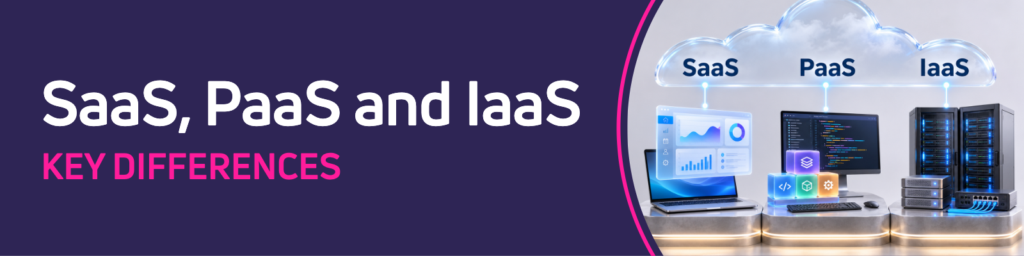
IaaS (Infrastructure as a Service) means renting computing power, storage and networking. You get virtual servers and install the operating system, databases and applications yourself.
PaaS (Platform as a Service) is a ready-made environment for building and running your own applications. The provider manages the servers, the operating system and the middleware, and developers only deploy their code.
Software as a Service (SaaS) is a ready-to-use application for the end user.
SaaS vs on-premise software
On-premise software is installed and maintained by a company on its own servers, usually under a license. It's the opposite of SaaS. Full control over the system and data comes with full responsibility for hardware, updates and security.
The difference is clear in the costs. With on-premise software, the biggest expense comes at the start: the license, servers and implementation. Later you add maintenance, administrator time and further updates. With SaaS, the upfront cost is usually lower, but you pay for as long as you use the service.
That's why you should compare the total cost over several years, not just the first invoice. The same logic applies when you calculate the cost of building your own online store. Besides the platform price, you need to account for hosting, implementation, development and developers' time, additional apps and technical support.
Advantages of SaaS solutions
The biggest advantage of SaaS is that you can start using a tool without investing in hardware or running an implementation project in your IT department. The other benefits come from the fact that the provider takes over the technical responsibility.
The most commonly cited advantages of SaaS are:
- Fast implementation. You create an account in minutes. You launch your first campaigns or reports once the integration is set up, not after a project that takes months.
- Lower upfront cost. You don't buy servers or a perpetual license. You pay for a plan that fits your current scale.
- Automatic updates. The provider rolls out security patches and gives you access to the latest features without downtime on your side.
- Scalability. When your customer base grows or Black Friday is coming up, you change your plan instead of expanding your infrastructure.
- Access from anywhere. Your team works from the office, from home or from a phone, and changes made by one person are visible to others in real time.
- Integrations. Popular SaaS apps come with ready-made connectors and open APIs, so it's easier to connect your store, payments, inventory and customer communication.
Want to see these advantages in a marketing automation platform built on the SaaS model? Book a demo of the ExpertSender platform and see how it connects to your online store.
Disadvantages and limitations of SaaS
The main limitations of SaaS come from handing control of the application's environment over to the provider. They aren't deal-breakers, but it's worth knowing them before you sign a contract.
The main drawbacks of the SaaS model:
- Dependence on the internet and service availability. Without a connection or during an outage on the provider's side, you can't work. Check the guaranteed uptime in the service level agreement (SLA) and how the provider reports incidents.
- Less room for customization. You can only change what the application allows. You handle non-standard processes with integrations or add-ons, not by changing the code.
- Data security in the provider's hands. Your company's or store's customer data is stored on external servers, so check how the provider protects it before you sign.
- Vendor lock-in. Switching tools means migrating data and integrations. Before you start, make sure you can export your data in a standard format.
- Long-term cost. A subscription paid for years may end up costing more than a license, especially with many users or a fast-growing contact list.
Examples of SaaS applications
You'll find SaaS applications in almost every department of a company, from accounting to customer service. You probably use many of them every day, even if you don't think of them in terms of a software delivery model.
Typical SaaS categories:
- office suites and communication: Google Workspace, Microsoft 365, Slack, Zoom
- CRM (customer relationship management): Salesforce, HubSpot, Pipedrive
- cloud ERP systems for enterprise resource planning: SAP S/4HANA Cloud
- project management: Asana, Trello, ClickUp
- customer service and help desk: Zendesk, Freshdesk, LiveChat
- data analytics and reporting: Looker Studio, Power BI
- e-commerce and marketing: Shopify, email marketing platforms, marketing automation and CDPs
Vertical SaaS, meaning software built for a single industry, is a separate group. Examples include booking systems for clinics, sports club management software, tools for accounting firms and platforms built specifically for online retail. The provider knows the industry, so the built-in features fit everyday work well.
Artificial intelligence is also becoming a common part of SaaS applications. Machine learning models recommend products, predict customer churn or prepare first drafts of content. In the SaaS model, these features reach users with an update, without a separate implementation of new technologies.
SaaS in e-commerce - what does it look like in practice?
In e-commerce, SaaS is one of the most popular ways to use software today. It covers everything from the store platform and payments to customer communication. Store owners rarely maintain their own servers. Instead, they combine several services into one ecosystem.
The differences show up as soon as you choose a platform. A store on Shopify runs on the SaaS model: you create an account, pick a theme and start selling, while hosting, security and updates are on the provider's side. You install WooCommerce on your own hosting as a WordPress plugin, so you take care of the server, backups and updates yourself or with an agency. The open-source version of Magento also requires your own infrastructure. Alongside it, Adobe offers Adobe Commerce in the cloud as a PaaS solution and, since 2025, a SaaS version as well.
Other SaaS services often run around the store platform: payment gateways, shipping carrier integrations, review systems and help desks. Then there's the marketing layer. A customer data platform (CDP) collects customer behavior data from the store, the app and campaigns into a single profile. Based on that data, marketing automation in your online store sends abandoned cart messages, product recommendations and win-back campaigns.
ExpertSender works this way too. It's a marketing automation and CDP platform that a store connects to its e-commerce platform through a ready-made integration or an API. Purchase and behavior data is analyzed in real time, so a workflow starts moments after the customer takes action. Well-designed workflows build customer loyalty without manual work from your team for every send.
Frequently Asked Questions (FAQ)
Is SaaS the same as the cloud?
Yes, SaaS is one of the cloud computing models, but not all cloud services are SaaS.
The cloud also includes renting infrastructure (IaaS) and development platforms (PaaS). SaaS is the layer closest to the user, a ready-to-use application available online.
What are some examples of SaaS?
Examples of SaaS include Google Workspace, Microsoft 365, Slack, Zendesk and Shopify. In e-commerce, email marketing, marketing automation and CDP platforms also run on this model.
Is SAP a SaaS?
It depends on the product. SAP S/4HANA Cloud Public Edition and SAP SuccessFactors run on the SaaS model, while the classic SAP S/4HANA can be deployed on-premise on a company's own servers. So one brand offers both models.
What is the SaaS industry?
The SaaS (Software as a Service) industry is made up of companies that build software and sell access to it as a subscription rather than a license. Their revenue comes from recurring fees, so keeping SaaS customers for longer matters to them as much as winning new ones.
Are Netflix and ChatGPT Software as a Service (SaaS)?
Netflix is a subscription streaming service and has some SaaS characteristics, but in the IT industry the term mainly refers to application and business software.
ChatGPT used in a browser on a paid plan works like a typical SaaS application, with artificial intelligence as its core feature. API access to AI models for developers, on the other hand, is sometimes described as a separate category, such as model as a service.
Do you pay for SaaS monthly?
Usually yes, but many providers also offer annual billing, often at a discount. You'll also find usage-based pricing and free freemium plans with limited features.
Latest Resources
We share our knowledge



-
![]()
Dashboard
-
![]()
Customer Profile 360°
-
![]()
Preference Center
-
![]()
Website personalization
-
![]()
Consents Management
-
![]()
Automated emails
-
![]()
Email Raports
-
![]()
High Deliverability
-
![]()
User real-time tracking
-
![]()
Automated scenarios
-
![]()
RFM analysis
-
![]()
Drag & drop editor
-
![]()
Omnichannel marketing
-
![]()
Recommendation frames
-
![]()
Message checklist
-
![]()
Banners, pop-ups, forms