WooCommerce – what is it?


If you’re thinking about launching an e-commerce business, sooner or later you’ll come across the term ‘WooCommerce’. This solution is frequently mentioned in discussions about online sales and e-commerce development, as it can be tailored to your specific needs.
But how does it work in practice? WooCommerce is a popular choice both among those setting up their first e-commerce site and companies looking to grow their sales in a more flexible way. For some, it will be a quick route to a simple, low-cost shop, whilst for others it will be a starting point for building a more sophisticated e-commerce platform.
However, before you move on to installation, online payment integration, shipping configuration or additional plugins, it’s worth having a good understanding of the basics. What exactly is WooCommerce, how does it work, and for whom is this solution a really good choice?
What is WooCommerce and how does it work?
WooCommerce is a tool / plugin for WordPress that allows you to extend your website with sales features and create an e-commerce site. It is thanks to this that you can add and sell products, manage orders, set up payment methods and grow your online sales based on the well-known WordPress system.
In practice, WooCommerce acts as an extension that adds the features needed to run a shop to WordPress. Once the plugin is installed, you’ll see new settings in the admin panel relating to products, the shopping cart, shipping, online payments and order management. This means you don’t have to build your shop from scratch.
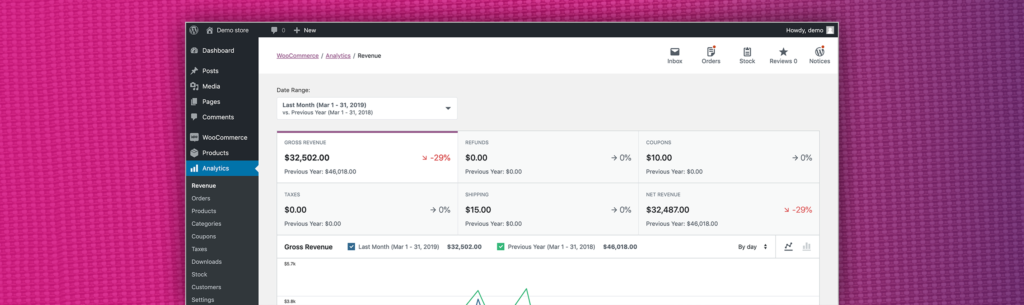
A major advantage of this solution is its flexibility. WooCommerce is open-source software, so it offers great freedom to tailor the shop to your own needs. You can start with the basic version and gradually expand your WooCommerce shop with additional plugins, new features and integrations.
It is also worth noting that the WooCommerce plugin does not work on its own. To launch a WooCommerce online shop, you need WordPress installed, hosting, a domain, and basic technical configuration, including an SSL certificate. It is precisely this combination of WordPress and WooCommerce that makes many companies choose this model as the optimal solution for online sales.
For some, it will be a free plugin used to launch a shop with a few products, whilst for others it will serve as a foundation for creating a functional shop that can be scaled.
Do you want to boost sales in your WooCommerce shop?
ExpertSender is a Marketing Automation tool designed for e-commerce.
We have an easy-to-use and intuitive ExpertSender plugin for WooCommerce, allowing you to quickly synchronise your e-commerce data with our platform.
Want to turn data into real sales? Try it for free!
What possibilities does a WooCommerce shop offer?
The WooCommerce plugin is a solution that allows you to start with a simple setup and then gradually add new features depending on your needs.
In practice, a WooCommerce online shop enables you to manage products, orders, stock levels, shipping and online payments from a single admin panel. This allows you to run your own e-commerce business without the need for several separate systems.
Flexibility is also a major advantage. WooCommerce allows you to:
- sell various products (physical and digital),
- integrate popular payment methods such as PayPal, Stripe, Amazon Pay, Apple Pay and others,
- integrate shipping options such as FedEx, UPS, DHL and others,
- expand the shop’s functionality using additional plugins.
As a result, a WooCommerce shop can serve as both a simple e-commerce solution to get you started and a foundation for further sales growth and scaling your e-commerce business.
What payment and shipping methods does WooCommerce support?
WooCommerce supports both basic and more advanced payment methods and shipping options. Even in the basic version, you can set up methods such as bank transfer, cash on delivery or collection in person.
In practice, a WooCommerce shop can also be easily integrated with popular online payment providers and payment systems such as Amazon Pay, PayPal, Apple Pay and Stripe.
The situation is similar when it comes to shipping. WooCommerce offers configuration of shipping costs, free shipping, and rates based on the value, weight or dimensions of the order. With additional plugins, you can also integrate the shop with carriers such as FedEx, DHL, UPS, and others.

What are the pros and cons of WooCommerce? Who is it a good solution for?
WooCommerce has many advantages, but it won’t be the ideal choice for everyone. This solution offers a great deal of freedom, but it also requires a basic understanding of WordPress, hosting and developing the shop in line with the business’s growing needs.
One of WooCommerce’s greatest advantages is its flexibility. The WooCommerce plugin allows you to launch an e-commerce site in its basic version and then expand it with additional plugins, new features and integrations tailored to your own needs. For many businesses, this is a good solution, as there is no need to invest immediately in a closed and expensive system.
Another major plus is that WooCommerce runs on WordPress and is available as a free plugin. This means the entry cost can be relatively low, and a WooCommerce shop can grow alongside your business, product range and online sales. This is particularly important for small and medium-sized businesses that want to retain control over the shop’s development.
However, it is worth bearing in mind the limitations. WooCommerce is not a ready-made ‘plug-and-sell’ service, so you need to take care of hosting, an SSL certificate, updates, security and selecting the right extensions. For more complex e-commerce setups, technical specifications, the quality of hosting and how well the entire shop has been configured also matter.
So, for whom is WooCommerce a good solution? Most often for businesses that want to launch an e-commerce site on their own terms, develop it gradually, and tailor it to their individual needs. It is a good option both for beginners and for brands that are thinking about scaling their e-commerce operations and want to have greater influence over the shop’s appearance, features, and development.
Frequently Asked Questions (FAQ)
WooCommerce and WordPress - are they the same thing?
No, WooCommerce and WordPress are not the same. WordPress is a content management system for creating websites, whilst WooCommerce is a plugin that adds the features needed to run an e-commerce business.
How much does an e-commerce site on WooCommerce cost?
It depends on the scope of the project. The WooCommerce plugin itself is free, but the cost of an e-commerce site usually includes hosting, a domain, an SSL certificate, implementation, and any paid plugins and integrations.
A very simple WooCommerce shop can be set up at low cost, and sometimes almost for free, if you use a ready-made theme and handle the configuration yourself. However, with a larger e-commerce site, the costs associated with developers, designers, implementation, optimisation and feature development increase - just as with other e-commerce platforms.
Is WooCommerce free?
Yes, WooCommerce is free in its basic version. The WooCommerce plugin itself costs nothing, but launching and running an online shop involves additional expenses, such as hosting, a domain, an SSL certificate or paid plugins.
In practice, a lot depends on how simple or complex you want your e-commerce store to be. You can launch a WooCommerce store at low cost to start with, but as the store grows, expenses often arise related to additional features, integrations, design and technical support
Is installing WooCommerce complicated?
No, installing WooCommerce itself is not complicated. In practice, all you need to do is install the plugin in WordPress, go through the basic setup, and configure the most important shop settings.
However, this is only the beginning. The more complex the web store is intended to be, the more issues arise regarding performance, SEO, language versions, additional integrations, or features tailored to specific business needs.
That’s why the best answer is: it depends. The basic version of WooCommerce and launching an e-commerce store is relatively straightforward, but with a larger project, the difficulty level increases - just as with any other e-commerce platform.
Latest Resources
We share our knowledge














-
![]()
Dashboard
-
![]()
Customer Profile 360°
-
![]()
Preference Center
-
![]()
Website personalization
-
![]()
Consents Management
-
![]()
Automated emails
-
![]()
Email Raports
-
![]()
High Deliverability
-
![]()
User real-time tracking
-
![]()
Automated scenarios
-
![]()
RFM analysis
-
![]()
Drag & drop editor
-
![]()
Omnichannel marketing
-
![]()
Recommendation frames
-
![]()
Message checklist
-
![]()
Banners, pop-ups, forms