Email list – how to build one for your online store?


Every online store collects email addresses. Customers provide them when placing an order, creating an account or contacting customer service. Yet many stores don't have an email list they can use to send a newsletter, a sale announcement or an abandoned cart reminder. An address stored in your store's system is not the same as permission to send marketing emails.
In this article, we explain what an email list is and how it differs from a customer database. We show where to collect sign-ups in your store, how to encourage people to subscribe and how to keep your list healthy. That way, growing your email list won't come at the expense of deliverability.
What is an email list?
An email list is a collection of email addresses belonging to people who have agreed to receive marketing messages from a company, such as newsletters, promotions or product updates. Besides the addresses themselves, the list usually holds data that helps tailor your communication: first name, sign-up source, purchase history or interests.
Many companies also call it a mailing list or a contact list. It is managed in an email marketing platform. That's where new subscribers land, where campaigns are built and where you can track how recipients respond to each send. The list brings current and potential customers together in one place. For many marketers, it's the core asset that all of their email marketing and customer communication relies on.
Email list vs. customer database
An email list and a customer database are two different things, even though they often contain the same addresses. The customer database includes everyone who has placed an order or created an account. The email list includes only those who have agreed to receive marketing communication.
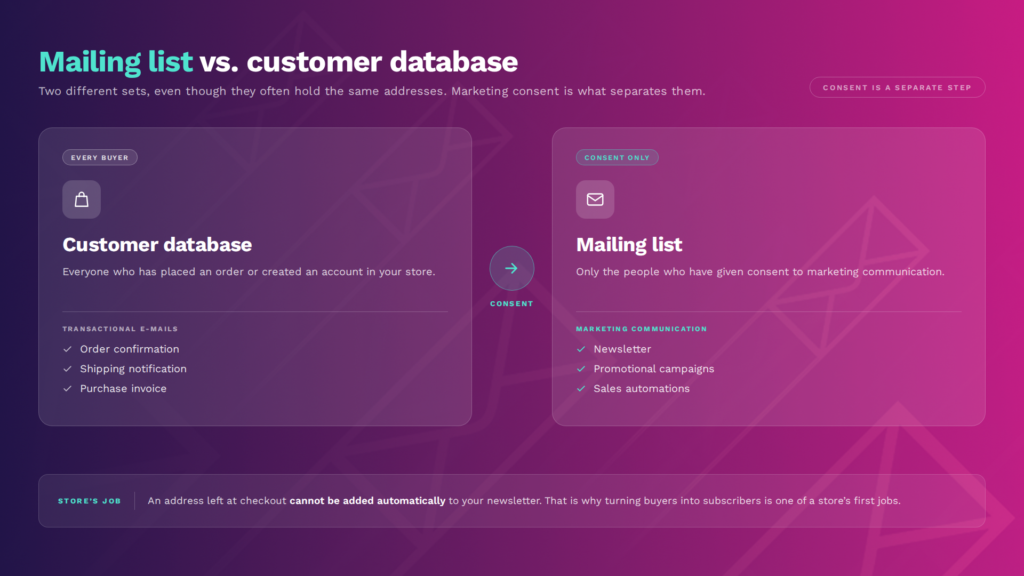
This difference matters in day-to-day work. An address provided at checkout is used to fulfill the order, that is, to send transactional emails such as order confirmations, shipping notifications or invoices. You shouldn't automatically add it to your email list and start sending newsletters. That's why one of the first tasks for any store is turning buyers into subscribers.
Why does an online store need its own email list?
Your own email list gives your store a direct channel to customers that doesn't depend on algorithms or an ad budget. The organic reach of social media posts changes along with platform rules, and ad costs climb during peak season, for example before Black Friday. With your own email list, you can reach your subscribers whenever you want without paying for every impression. Few online channels offer that kind of independence.
The second reason is building customer relationships. Regular emails with valuable content, such as tips, inspiration or collection previews, keep people interested in your brand between purchases. This takes longer than a single campaign, but a strong relationship is easier to turn into repeat orders than winning a new customer from scratch.
The third reason is data. When you know where someone signed up, what they bought and which emails they open, you can personalize your communication and tailor your offer to their needs. Automation relies on your email list too: abandoned cart workflows, price drop alerts and post-purchase emails only work if you're allowed to contact the customer. The result is higher engagement and better campaign performance than with a single blast sent to everyone.
How to build an email list for your online store
Building an email list for your store takes a few steps: choose a platform, place sign-up forms where your customers spend time and give them a reason to subscribe. Then welcome new subscribers with a series of emails.
There is no single source of sign-ups that will keep working for years. What works best is combining several methods and regularly checking which ones bring in engaged subscribers.
It pays to start building your email list from your store's first days. Every month without sign-up forms means hundreds of visits that leave you with no contact and no chance to build a relationship.
Choose a platform and set up sign-up forms
Before you start building an email list, you need a tool to store it in. Email marketing and marketing automation platforms let you create forms, record consent together with the date and source of the sign-up, send campaigns and track results.
Setting up a simple form in such a platform usually takes a few minutes. If you use off-the-shelf e-commerce software such as WooCommerce, check the available integrations. With an integration in place, order and cart data appear on your list as well.
Your sign-up form should be short. In many cases, an email address and perhaps a first name for personalization are all you need. Keep in mind that every extra field lowers the number of sign-ups, so it's better to ask about preferences later, for example in a welcome email.
Also consider confirming sign-ups with double opt-in: the subscriber receives an email with an activation link and is added to the list only after clicking it. This protects your list from typos and fake addresses.
Collect sign-ups at key points in your store
Most sign-ups come from places where customers already interact with your store: the account registration form, the cart and the product page. A form in the site footer is a must, but on its own it's rarely enough.
The table below shows where to collect sign-ups in your store and what to watch out for.
Where to collect email sign-ups in your online store
Of these, the pop-up window plays a special role. Shown at the right moment, for example after several seconds on the page or when a visitor is about to leave, it often becomes one of your main sources of new subscribers. Shown too early, it covers your offer and puts people off, which mobile users notice most.
Give people a reason to sign up - a lead magnet or a welcome discount
People sign up for an email list when they see something in it for them. A plain "Sign up for our newsletter" doesn't work well because it doesn't say what customers get in exchange for their email address. That's why it's worth pairing your form with a specific incentive.
In e-commerce, this is most often a first-order discount or free shipping. It works, but it has a downside: it also attracts people who just want a one-time discount and unsubscribe right after buying.
An alternative is a lead magnet, meaning content that addresses the needs of your target audience. It could be a size guide, a care checklist, a catalog of your new collection or early access to a sale. A bonus like this attracts people interested in the topic, not just the discount. If discounts fill your list mostly with bargain hunters, a good lead magnet may be the better choice.
It's hard to choose the right incentive without knowing your target audience. Ask your customer service team about the most common questions and find out what customers are looking for. It's a simple way to understand their needs. An electronics store might offer a buying guide or an up-to-date comparison chart, while a beauty store might offer access to new product trials. You can test different options and check which incentive brings not only the most sign-ups, but also the most active subscribers a few weeks later.
Create a sign-up page (landing page)
A sign-up page, or landing page, is a separate page whose only goal is to collect email addresses from potential customers. It comes in handy where a form on your store's website isn't enough: in online ads, social media posts, a QR code on a flyer or the email signature of your customer service team.
A good landing page for an online store clearly states what subscribers get in return, how often they'll hear from you and where to enter their address. Creating a sign-up page doesn't have to be a big project. All you need is a benefit-driven headline, a short description, a form and a note on how the data will be processed. The fewer elements on the page, the higher the conversion rate tends to be.
Promote sign-ups outside your store
You can also grow your email list outside your store's website. Use the places, online and offline, where your potential customers already spend time. That's where you'll reach people who may not know your store yet.
What usually works best:
- social media: a sign-up page link in your Instagram bio, a pinned post on Facebook and, in B2B sales, posts on LinkedIn,
- ads with a built-in form (lead ads) that let users sign up without leaving the platform,
- the package: a flyer with a QR code linking to your sign-up page reaches someone who has just bought from you and already knows your store,
- partnerships with creators and guest posts on industry websites that send readers to your sign-up page.
Check which sources bring people who actually read your emails. That makes it easier to decide where to invest your time and where to test new ways of collecting contacts.
Welcome new subscribers with a welcome series
The first few days after signing up decide whether a new subscriber becomes an engaged reader. That's when they remember your store best and are waiting for the promised discount or content. It's a good moment to introduce yourself, deliver the bonus and show them what to expect.
Instead of a single email, plan a welcome email series. The first email delivers the promised bonus, and the following ones introduce your brand, bestsellers and valuable content such as guides. This is where automation helps: the emails go out on their own at set intervals. If someone hasn't used their discount code, the series can remind them before it expires. This sequence is where your relationship with a new subscriber begins.
Forms, a welcome series and further workflows work best when they draw on customer and purchase data collected in one system. If you'd like to see how this works in practice, book a demo of the ExpertSender platform.
How to maintain your email list once it's built
An email list needs ongoing care. Segment it regularly, remove inactive addresses and monitor your results. A large but neglected list sends a worse signal to mailbox providers than a smaller list of engaged subscribers. Building your email list is only the beginning.
Focus on four areas:
- Segmentation. Divide your list into groups based on data and behavior: new subscribers, first-time buyers, repeat customers and people interested in a specific category. A message tailored to a specific group drives more engagement than one campaign sent to your entire list. This approach also helps build relationships with your audience.
- List hygiene. Remove addresses that your emails don't reach. Delete contacts who haven't opened your emails in a long time. Before removing them, you can send a re-engagement campaign. A clean list helps protect your sender reputation and makes it easier to land in the inbox.
- Easy unsubscribe. Including an unsubscribe link in every email helps you meet Gmail and Yahoo sender requirements. It also protects you from spam complaints, because people who can't find the link often click "Report spam" instead.
- Performance tracking. Regularly check email marketing metrics such as open rate, click-through rate (CTR) and the number of unsubscribes. A sudden spike in unsubscribes after a campaign is a sign that your content or sending frequency doesn't match what your audience wants.
Frequently Asked Questions (FAQ)
What are email lists?
Email lists are collections of email addresses belonging to people who have agreed to receive messages from a company, such as newsletters or promotions. Companies manage them in an email marketing platform and use them to send campaigns and automated emails.
Is it worth buying an email list?
No. People on a purchased list usually haven't agreed to hear from your store, so emailing them often breaks anti-spam rules and mailbox provider policies.
Purchased lists also tend to contain inactive addresses and spam traps, which lower your email deliverability, damage your sender reputation and can get your domain blacklisted.
What does it mean when an email comes from a mailing list?
It means the email was sent to many subscribers at once, for example as a newsletter. Email clients recognize such messages by, among other things, the List-Unsubscribe technical header and may display an unsubscribe button next to the sender's name.
How do you unsubscribe from email lists?
The easiest way is to click the unsubscribe link in the email footer or the unsubscribe button in your email client.
Gmail and Yahoo require senders who send more than 5,000 messages a day to offer one-click unsubscribe and to process unsubscribe requests within 2 days.
Can you add store customers to your list without their consent?
In most cases, no. An address given at checkout is meant for order-related emails, while marketing emails usually require separate consent, and the exact rules depend on the countries you sell to. Instead, encourage customers to sign up, for example with a checkbox in the cart, a discount on their next purchase or a flyer in the package.
Latest Resources
We share our knowledge










-
![]()
Dashboard
-
![]()
Customer Profile 360°
-
![]()
Preference Center
-
![]()
Website personalization
-
![]()
Consents Management
-
![]()
Automated emails
-
![]()
Email Raports
-
![]()
High Deliverability
-
![]()
User real-time tracking
-
![]()
Automated scenarios
-
![]()
RFM analysis
-
![]()
Drag & drop editor
-
![]()
Omnichannel marketing
-
![]()
Recommendation frames
-
![]()
Message checklist
-
![]()
Banners, pop-ups, forms