What are pop-up windows?

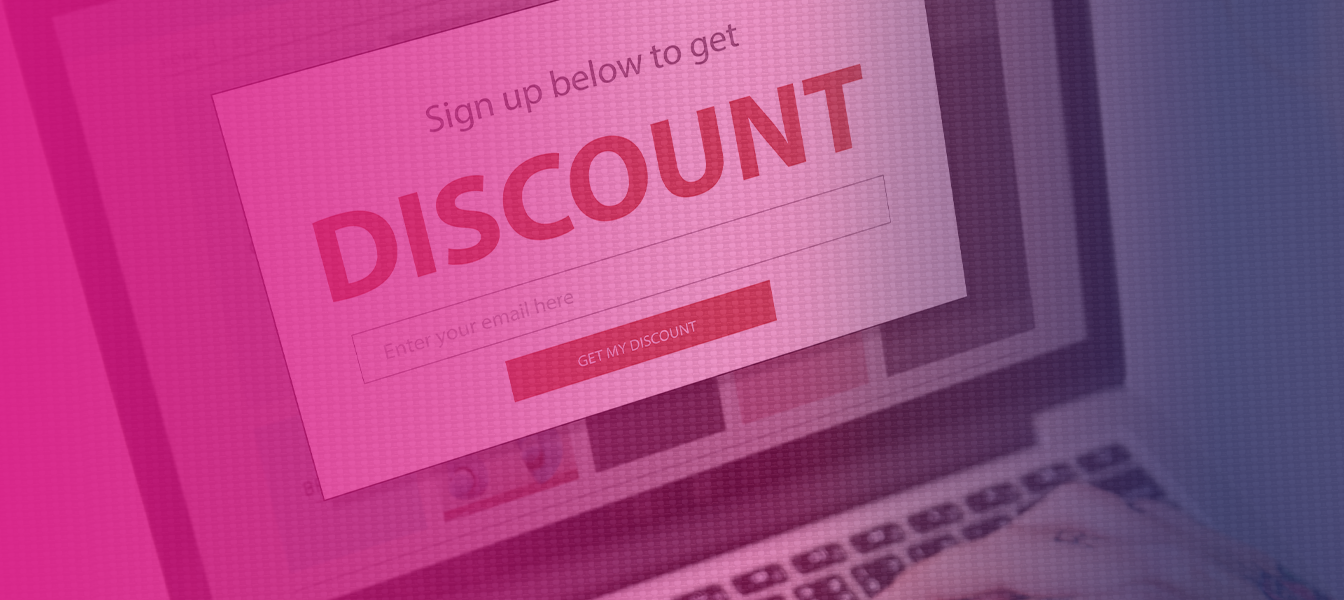
Pop-up windows have been stirring up extreme emotions for years – some people ignore or block them, while others consider them an essential marketing tool. Today, many websites feature various forms of pop-ups that appear at the right moment and with a clearly defined message (at least that is how it should be).
The main purpose of pop-ups is to:
- attract the reader's attention,
- keep the user on the website,
- encourage them to perform a specific action, instead of letting them leave the website and immediately go to a competitor's site, for example.
In practice, pop-ups have become an integral part of modern websites, especially in e-commerce. Properly designed pop-ups can support sales, build mailing lists or a base of followers on social media, and inform recipients about promotions and new products.
However, it is worth understanding what exactly a pop-up window is, how it works, and why – despite changing trends – it remains an effective online communication tool.
What are pop-ups?
A pop-up is a special window that appears on a website in response to a specific user activity or when a certain condition is met. It can be displayed on the entire page, on the side of the page or in its upper right corner, presenting a short message, offer or call to action.
A pop-up acts as a layer overlaid on a web page and is visible without having to navigate to another section of the site. This means that the user does not have to search for information themselves – the message appears exactly when it is most likely to be noticed. A pop-up window can encourage users to subscribe to a mailing list, leave their email address, take advantage of a discount or learn about an offer.
The main advantage of pop-ups is the ability to communicate directly with the recipient in real time. Unlike banners or classic advertisements, pop-ups do not get lost in the background of the website, but focus the user's attention on one clearly defined goal.
With the right display and content matching, pop-ups can really support conversion and the achievement of marketing goals.
Types of pop-ups used on websites
Pop-ups differ in the way they are displayed, when they appear on a given website, and the purpose they are intended to fulfil on the website.
The right choice of pop-up type allows you to tailor the message to the user's behaviour and increase the effectiveness of your marketing activities without negatively impacting the recipient's experience.
On websites, we can find both classic pop-up windows and more subtle forms that do not cover the entire page, yet still effectively attract the reader's attention.
It is crucial that pop-ups are displayed at the right time and in the right context, and not in the same way every time.
Time-based pop-ups and pop-ups after scrolling
Time-based pop-ups and pop-ups displayed after scrolling appear after a specified time or after the user performs a specific action. These are among the most commonly used pop-ups because they are based on the recipient's actual engagement with the content of the page.
A time-based pop-up can appear a few or several seconds after entering a website, giving the user a moment to familiarise themselves with the content. A scroll-based pop-up, on the other hand, is triggered when the recipient reaches a specific place, for example after reading an article or part of an offer.
Such pop-ups are often perceived as less intrusive because they respond to user activity rather than appearing immediately after entering the website.
Exit pop-up – the last chance to get the user's attention
An exit pop-up is a pop-up window that appears when the user is about to leave the website. It is a form of pop-up used as a ‘last resort’ before the recipient closes the site or moves on to another page.
The exit pop-up mechanism analyses cursor movement or behaviour on the user's device and displays a message exactly when there is a risk of losing the recipient. Most often, it contains a special offer, discount or reminder of an unfinished action.
Exit pop-ups can be particularly effective in online shops, where they can encourage the user to return to their shopping cart, claim a discount or subscribe to a mailing list instead of leaving the site immediately.
Welcome mat and full-screen pop-up
Welcome mats and full-screen pop-ups are formats that take up the entire page or a significant part of it when displayed. Their purpose is to maximise the user's attention on one key message.
A welcome mat usually appears when you enter the home page and can inform you about a promotion, a new offer or encourage you to perform a specific action. These types of windows are very visible, so they require well-thought-out content and a clear close button.
The full-screen version works well when the message has the highest priority. However, it is worth remembering that pop-ups should be used in moderation so as not to discourage the user at the very first stage of contact with the website.
Slide pop-ups and side pop-ups
Slide pop-ups and pop-ups displayed on the side of the page are a less intrusive alternative to classic pop-ups. They usually appear at the bottom of the page or slide smoothly out from the edge without obscuring the entire content.
These types of pop-ups are often used to inform users about news, promotions or the possibility of subscribing to a newsletter. Thanks to their subtle display, they do not interfere with the use of the website and are more acceptable to the audience.
Slide pop-ups work particularly well on longer subpages, where the user is already engaged with the content and more likely to interact with an additional message.
What marketing role do pop-ups play?
Pop-ups serve as a direct marketing communication tool. They allow you to quickly reach the user with your message and do so at the right moment.
As a result, a pop-up is not a random addition to a website, but a consciously designed element that supports the achievement of specific business goals.
In practice, pop-ups are used to inform users about promotions, new offers, changes to the website or limited sales campaigns. They are also an excellent way to generate leads, build mailing lists and direct recipients to perform a specific action using a clear CTA.
The main advantage of pop-ups in marketing is their flexibility and customisability. The message on your website can be tailored to the source of traffic, the stage of the purchase path, user activity, or the type of device on which the website is viewed.
Pop-ups in online shops and e-commerce
Pop-ups in online shops are one of the most commonly used tools to support sales and conversion. Their task is not only to present the offer, but also to respond to user behaviour in real time and guide them through the subsequent stages of the purchasing process.
In e-commerce, pop-ups can inform about discounts on first purchases, remind about abandoned shopping carts, offer free delivery or encourage users to subscribe to a newsletter in exchange for a benefit. Such pop-ups appear at key moments, increasing the chance of keeping the user on the website and finalising the transaction.
Pop-ups also fit perfectly into Marketing Automation activities, where messages are automatically tailored to the recipient based on their behaviour. This allows eCommerce to conduct personalised communication without the need to engage additional resources.
Read also: Omnichannel – what is it and how does it work? >>>
The main advantages of using pop-ups
The main advantage of using pop-ups is the ability to immediately draw the user's attention to a specific message without having to change the structure of the website. Pop-ups allow you to highlight the most important information exactly when the recipient is most likely to interact.

Properly designed pop-ups are a great way to increase conversions, build relationships with your audience, and achieve your sales goals. They allow you to effectively promote special offers, newsletter subscriptions, discounts, or new products without interfering with the main content of your website.
Another big advantage of pop-ups is their flexibility. They can be displayed depending on user activity, time spent on the site, device type or traffic source, making them an effective tool in both marketing automation and e-commerce.
Call to action placed directly on the pop-up
A call to action placed directly on the pop-up significantly increases the chance that the user will perform the desired action. A clear message and a clear CTA eliminate the need to guess what to do next.
A pop-up with a clear CTA guides the recipient step by step – it can encourage them to sign up, download material, take advantage of an offer or go to a specific section of the website. The simpler and more specific the content, the more effective the entire window is.
In practice, CTAs based on benefits and attractive content work best. Those that clearly communicate value to the user. Thanks to this, the pop-up is not perceived as intrusive advertising, but as a helpful element of the website.
Disadvantages and risks associated with pop-ups
The disadvantage of pop-ups is the risk of excessive interference with the comfort of using the website if they are poorly designed or displayed too often. An excess of pop-ups can lead to user frustration and prompt them to close the message as quickly as possible.
Inappropriate display of pop-ups, inability to close them easily, or presenting too much data in a single window can negatively affect the perception of the entire website. In extreme cases, the user may leave the website altogether or block such elements.
Another risk is when pop-ups are not tailored to the context and the recipient's intentions. Messages displayed randomly, unrelated to the content of the page, often have the opposite effect to that intended.
Pop-ups and user experience (UX)
Pop-ups affect the user's experience immediately after entering the website. Therefore, their design should take UX principles into account first and foremost. Well-designed windows can support navigation and communication rather than disrupting it.
From a UX perspective, it is important that the pop-up appears at the right moment, has a clear purpose and a clearly visible close button. The user should feel in control of what they see on the page, rather than feeling forced to interact.
Contrary to popular belief, pop-ups do not have to worsen the user experience. If they are tailored to user behaviour and offer real value, they can become a natural part of the website experience.
Pop-ups on mobile devices – what should you keep in mind?
Pop-ups on mobile devices require special care, as they directly affect the comfort of using a website on a small screen. Unlike the desktop version, pop-ups on smartphones can easily cover the entire page and make it difficult for the user to perform basic tasks.

First and foremost, you need to ensure that the pop-up is responsive and legible on different mobile devices. The message should be short, understandable and include a clear close button that allows the window to be closed quickly without frustration. Too much data or a complicated form can effectively discourage the recipient.
Google's guidelines are also important, as they promote mobile-friendly websites and negatively evaluate intrusive pop-ups that cover the content immediately after entering the website. Therefore, on mobile devices, the best solution is subtle forms of pop-ups, such as slide pop-ups at the bottom of the page or windows that appear after a specific action has been performed.
Summary
Pop-up windows are a tool that, when used wisely, can really support marketing and sales goals on a website. Thanks to their various forms and personalisation options, pop-ups allow you to communicate effectively with the user at the right time and in the right context.
However, the key to success is moderation and tailoring pop-ups to the behaviour of the recipient, the type of website and the device they are using. Pop-ups should not be disruptive, but should offer real value – information, benefits or help in making a decision.
Pop-ups are certainly not a universal solution, but in many cases they remain an excellent way to increase conversions, build relationships with users and implement a Marketing Automation strategy, especially in e-commerce.
Frequently asked questions (FAQ)
Pop-ups vs push notifications – how do they differ?
Pop-ups allow you to display messages with specific content to users directly on the website, while push notifications appear on the user's device even after they leave the site.
Pop-ups work within a single page, while push notifications require prior consent and enable communication outside the website.
What are pop-ups windows ?
Pop-ups are additional windows displayed on a website in response to specific user behaviour or the fulfilment of a given condition. They are used to convey messages, offers or encourage specific actions.
What are pop-ups?
Pop-ups are elements of the website interface that appear above its content to draw the user's attention to specific information. They are most often used for marketing, informational or sales purposes.
How does a pop-up work on a website?
A pop-up works based on rules defined in the website system, such as time spent on the site, scrolling through content or the intention to leave the site. Once the condition is met, the pop-up displays a message that is intended to prompt the user to interact in a specific way.
Are pop-ups a good way to communicate with users and do they involve additional legal issues?
Yes, pop-ups are a great way to convey short messages and clear calls to action to users of your website or application. Of course, as long as they comply with applicable regulations.
When implementing pop-ups, legal issues such as the following must be taken into account:
- consent to data processing,
- consent to marketing communication.
Legal issues are particularly important when pop-ups help us collect data such as:
- e-mail address,
- telephone number,
- first and/or last name,
- as well as other personal data.
Are there tools for creating and managing pop-ups?
Yes, there are tools that allow you to design, test, and automate pop-ups without interfering with the website code.
Such solutions allow you to create pop-ups, but also manage their display, personalise their content, and tailor them to user behaviour and marketing objectives.
Would you like to test pop-ups and other Marketing Automation tools?
Arrange a short meeting and see how ExpertSender can help you implement solutions that will increase sales in your online shop.
Latest Resources
We share our knowledge



-
![]()
Dashboard
-
![]()
Customer Profile 360°
-
![]()
Preference Center
-
![]()
Website personalization
-
![]()
Consents Management
-
![]()
Automated emails
-
![]()
Email Raports
-
![]()
High Deliverability
-
![]()
User real-time tracking
-
![]()
Automated scenarios
-
![]()
RFM analysis
-
![]()
Drag & drop editor
-
![]()
Omnichannel marketing
-
![]()
Recommendation frames
-
![]()
Message checklist
-
![]()
Banners, pop-ups, forms