Double opt-in – what is it and why is it worth using?


Signing up for a newsletter seems simple at first glance. Someone enters their email address, is added to the list and receives their first message. In practice, however, there is one more decision to be made between the sign-up form and the inbox, which determines the quality of the entire contact database.
Double opt-in is a mechanism that requires the user to confirm their subscription before their email address starts receiving emails. Find out exactly what double opt-in involves, how it differs from the simpler alternative - single opt-in - and how to implement it in your email marketing.
What is double opt-in?
Double opt-in is a two-step process for subscribing to a mailing list. The user first enters their email address in a form, then confirms their subscription by clicking on a link contained in an email sent to that address. Only after this second step is the contact added to the database and begins to receive campaigns.
The term ‘opt-in’ itself refers to consent given actively. The user decides for themselves that they want to receive messages from your brand and takes a specific action to that end. The opposite is a model in which someone is added to the list without further confirmation.
In the double opt-in model, this consent is given twice and in two different places. Once on your website - whilst filling in the form - and a second time in their inbox. This distinction is important because only the second step confirms that the person signing up actually has access to the email address provided.
How does double opt-in work?
Double opt-in works in four stages, two of which are carried out by the user and two by the email platform. The whole process usually takes less than a minute.
- Filling in the form. The user enters their email address and ticks the box to agree to receive messages.
- Pending subscription. The email address is added to the system but with a separate status. It is not yet included in email sends.
- Confirmation message. A confirmation email containing an activation link is sent to the address provided in the form.
- Confirmation. After clicking the link, the contact’s status changes to active, and the system may redirect the user to a thank-you page. From this point onwards, the address will receive your campaigns.
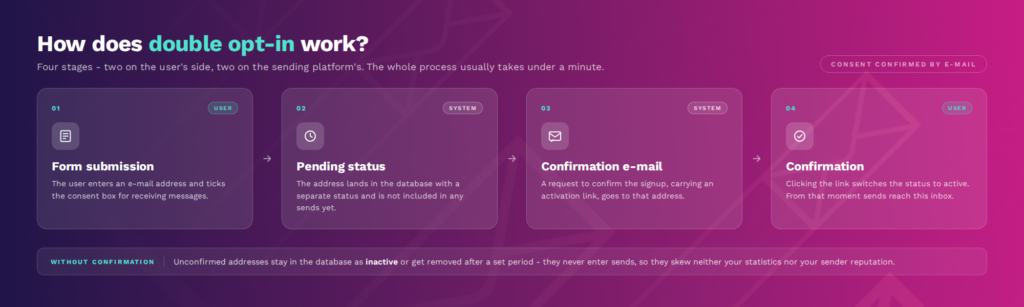
Addresses that are never confirmed remain in the database as inactive or are removed from it after a set period. They are not included in mailings, so they do not affect the sender’s statistics or reputation. This is a significant difference from the model in which every string of characters entered immediately ends up on the list.
Single opt-in versus double opt-in - how do they differ?
Single opt-in and double opt-in differ by a single step - the confirmation of the address before it is added to the subscriber list. With single opt-in, a contact is added to the list immediately after submitting the form, without any verification.
This single difference has a whole series of consequences. The contact database grows differently, its quality varies, and you document consent differently.
Single opt-in is sometimes justified for short-term sales campaigns or where every touchpoint counts and minimal friction is key. Double opt-in is the better choice wherever you’re building a database for the long term, and its quality directly impacts deliverability and revenue.
Why is it worth using double opt-in?
Double opt-in is worth using primarily because it protects your email deliverability and improves the quality of your contact database. Every address on the list is genuine and belongs to a person who has consciously consented to be contacted.
The greatest benefit is filtering out invalid addresses - such as a typo in the domain, a temporary address or a bot entry. Such email addresses will never pass the confirmation stage. This helps you reduce hard bounces, which are the quickest way to damage your sender reputation with mailbox providers such as Gmail or Yahoo.
Reputation directly determines whether your campaigns land in the inbox or in the spam folder. A list built on a double opt-in basis generates fewer bounces and fewer abuse reports, so spam filters treat your emails more leniently. This effect builds up over time and applies to all email marketing carried out from that domain.
Confirmed subscribers are also usually more engaged. Someone who has taken that extra step remembers they’ve subscribed and is more likely to open your emails. The list grows more slowly than with single opt-in, but your open and click-through rates reflect a genuinely interested audience.
The final argument concerns compliance with the GDPR. The regulations do not mention ‘double opt-in’ by name, but they require consent to be freely given, specific, informed and unambiguous - and you must be able to demonstrate it. A recorded click on a confirmation link is the simplest proof that such consent has actually been given.
See also: 6 things that will quickly improve your email deliverability >>>
How do you implement double opt-in in an online shop?
Implementing double opt-in essentially involves configuring three elements: the sign-up form, the confirmation email and the thank-you page. Most email marketing and marketing automation systems support this process as standard.
Start with the form. Make it clear in the form that a confirmation request will be sent to the provided email address. Users who are expecting this are much less likely to abandon the process.
The confirmation email should be sent immediately after the form is submitted and contain a single, clear link. No offers, no product recommendations, no additional links. The subject line must clearly state what the email is about, as the recipient needs to find it in their inbox within a few seconds.
Once they click the link, redirect the subscriber to a dedicated thank-you page. A simple landing page works well here; it confirms the subscription and suggests the next step - for example, a discount code for their first order, a link to the bestsellers category, or a preview of what to expect in future emails.
Also plan what happens to unconfirmed addresses. Best practice for double opt-in involves sending a single reminder after 24-48 hours and removing the contact from the database after a set period. You can set up this entire sequence - form, confirmation, reminder, landing page - once as a workflow in your marketing automation tool, and it will run continuously.

Double opt-in is one of those details you don’t need to build from scratch - in ExpertSender, it’s built into the standard sign-up process.
The same applies to the rest of your day-to-day email marketing work. Marketing automation workflows take over repetitive tasks and help boost revenue for your online shop.
Book a demo and see how it works with your contact database.
Frequently Asked Questions (FAQ)
What does ‘double opt-in’ mean?
Double opt-in means double confirmation of subscription to a mailing list. The user first fills in a form and then clicks on a link in a confirmation email sent to the address provided. Only this second action adds them to the contact database.
The confirmation message can be brief. A simple “Confirm your email address” or “Click ‘confirm’ to receive your emails” is sufficient.
What does ‘opt-in’ mean?
Opt-in is consent to receive messages, given by the recipient actively and of their own accord.
In email marketing, this means that no one is added to the list without making a conscious decision. The single opt-in model requires one such action, whilst the double opt-in requires two.
Is it worth enabling double opt-in?
In most cases, yes. Especially if you’re building a list for the long term.
Double opt-in slows down list growth, but filters out invalid addresses, protects deliverability and provides clear proof of consent. Single opt-in may be justified for short-term campaigns aimed at rapid reach.
In which countries is double opt-in required?
No legislation explicitly mandates double opt-in - not even the GDPR, which refers only to demonstrable consent. In practice, the strictest market is Germany, where case law has made double confirmation the de facto standard of proof. A similar approach is taken in Austria and Switzerland.
Latest Resources
We share our knowledge













-
![]()
Dashboard
-
![]()
Customer Profile 360°
-
![]()
Preference Center
-
![]()
Website personalization
-
![]()
Consents Management
-
![]()
Automated emails
-
![]()
Email Raports
-
![]()
High Deliverability
-
![]()
User real-time tracking
-
![]()
Automated scenarios
-
![]()
RFM analysis
-
![]()
Drag & drop editor
-
![]()
Omnichannel marketing
-
![]()
Recommendation frames
-
![]()
Message checklist
-
![]()
Banners, pop-ups, forms