Sender Policy Framework (SPF) – what is it?


Sending emails and using automation seems straightforward. You create the content, select the recipients and launch the campaign. In practice, however, before an email reaches the recipient’s inbox, it must pass through several technical trust filters along the way.
Mail servers check whether a particular message was actually sent from the source listed in its headers. This is particularly important in email marketing, where a single domain may use various systems to send emails: marketing automation platforms, CRM systems, transactional systems or customer service tools.
If a domain’s configuration is incomplete, even a well-prepared email may be flagged as suspicious or end up in the SPAM folder. That is why email authentication mechanisms, such as SPF, have a direct impact on security, domain reputation and message deliverability.
What is the Sender Policy Framework (SPF)?
The Sender Policy Framework (SPF) is an email authentication mechanism that helps mail servers verify whether a particular sending server is authorised to send emails on behalf of a given domain.
In practice, SPF (Sender Policy Framework) acts as a list of authorised senders. An SPF record is published in the domain settings, specifying which servers or IP addresses are authorised to send emails from that domain. When an email reaches the recipient, the receiving server checks whether the sending server’s IP address is on this list.
In this way, the Sender Policy Framework helps to prevent domain spoofing - situations where someone attempts to send an email from a fake source. SPF does not evaluate the content of the message itself, nor does it independently determine whether it is of value to the recipient. Its role is more technical: to confirm whether the sending server is authorised to send email on behalf of your domain.
This is of great importance to companies running email campaigns. If you use an external tool to send messages, such as a marketing automation platform like ExpertSender, your SPF record should include that platform’s servers. Otherwise, an email may be flagged as unauthorised, even if it was sent legitimately and to the correct recipient.
In a nutshell: The Sender Policy Framework (SPF) helps mail servers distinguish authorised sending sources from those attempting to impersonate the domain. A well-configured SPF record enhances email security and improves email deliverability.
How does SPF work in practice?
SPF comes into play when mail servers check whether an email has been sent from an authorised source. The entire process takes place in the background, before the message reaches the recipient’s inbox or is flagged as suspicious.
When you send an email campaign from the Marketing Automation platform, the system routes the email via a specific sending server. The receiving servers then check whether the IP address of the sending server matches the one specified in the SPF record for that domain.
This can be compared to a guest list at the entrance to an event. If the sending server is on the list of approved sources, the email passes SPF verification. If it is not on the list, mail servers may treat it as higher risk.
In practice, the SPF record does not act on its own as a guarantee that a message will be delivered to the main inbox. It is one element of a larger trust system, alongside mechanisms such as DKIM and DMARC. However, without a valid SPF record, email deliverability can be significantly reduced.
What does the receiving server check when it receives an email?
First and foremost, the receiving server checks whether the IP address of the sending server is listed in the SPF record for the domain used to send the email.
First, the receiving server reads the domain associated with the email. It then retrieves the SPF record from that domain’s DNS settings and compares it with the IP address of the server from which the email originated. If the IP address complies with the rules specified in the SPF record, the verification result may be positive.
It is important to note that SPF does not check the entire content of the message. It does not assess whether the subject line is appealing, whether the offer is well-written, or whether the recipient wants to receive the communication in question. It checks one specific element: whether the sending server is authorised to send messages on behalf of your domain.
This enables mail servers to better distinguish legitimate communications from attempts to impersonate a brand. This is particularly important when a company uses several systems to send emails.
What does the SPF result mean?
The SPF result indicates whether the sending server has passed verification based on the domain’s SPF record. In other words, mail servers check whether the email was sent from a location that is technically authorised to do so.
You will most commonly encounter several types of results:
- Pass means that the sending server’s IP address matches the SPF record.
- Fail indicates that the server is not authorised to send messages on behalf of the domain in question.
- Softfail suggests that the email raises concerns, but should not necessarily be rejected straight away.
- A neutral result may also appear when the domain does not provide a clear answer.
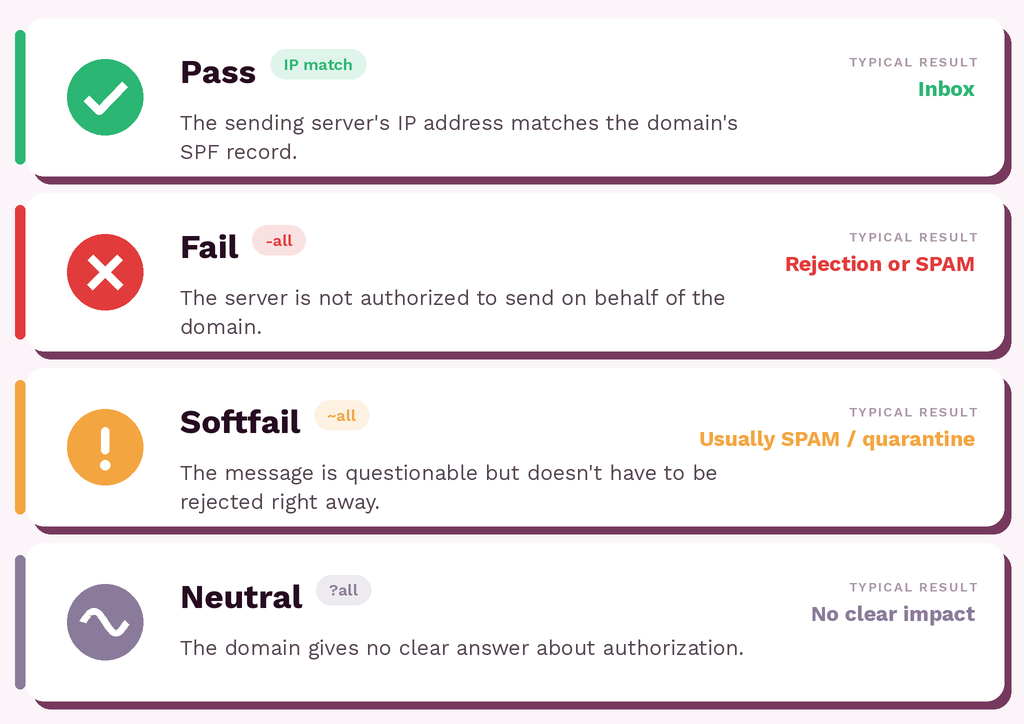
These names are usually invisible to the recipient, but they are of great importance to receiving servers. The SPF result can influence whether an email ends up in the inbox, the SPAM folder, quarantine, or is rejected.
It is worth remembering that SPF alone does not determine everything. Mail servers also take other factors into account, including the domain’s reputation, sending history, message content, recipient engagement, and DKIM and DMARC results. Therefore, a positive SPF result helps, but it is not the sole guarantee of good deliverability.
What does an SPF record look like in domain settings?
An SPF record is a TXT entry added to a domain’s DNS settings, which specifies which servers are authorised to send emails on its behalf. This is where you specify which sending sources are authorised.
An example SPF record might look like this:
v=spf1 include:example.com ip4:192.0.2.10 -allIt begins with v=spf1, which indicates that the entry is an SPF record. This is followed by mechanisms specifying permitted sending sources, such as include, which allows servers from an external provider to be included, or ip4, which specifies the exact IP address of the sending server.
The end of the record is also significant. The -all entry means that servers not on the list should not be treated as authorised to send email on behalf of this domain. You may also come across ~all, which is a more lenient approach suggesting that an unauthorised email is suspicious but does not necessarily have to be rejected straight away.
In practice, the SPF record should include all systems that send emails from your domain. Each of these sources may need to be added to the SPF record.
Why is SPF important for email deliverability?
SPF is important for email deliverability because it helps mail servers assess whether a message comes from a trusted source. If the sending server is correctly authorised in the SPF record, the email gains a strong signal of credibility.
For senders, this is particularly important when regularly sending campaigns, newsletters, transactional emails or automated messages. Even the best content will be ineffective if the email ends up in the spam folder or is blocked en route.
See also: Email deliverability in 2026 >>>
A well-configured SPF record supports the domain’s reputation and reduces the risk of a legitimate email being flagged as suspicious. However, it does not work in isolation from the rest of the configuration - it yields the best results when used in conjunction with DKIM, DMARC, good database hygiene and a reasonable sending frequency.

Do you want your emails to always reach their recipients? We’ll help you sort out the technical side of things when implementing an effective marketing automation system.
SPF, DKIM and DMARC - how do they differ?
SPF, DKIM and DMARC are three mechanisms that work together to help mail servers assess whether an email is legitimate. However, each one checks a slightly different aspect of the email delivery process.
SPF verifies whether the sending server is authorised to send email on behalf of a given domain. DKIM adds a cryptographic signature to the message, which helps confirm that the content has not been altered after sending. DMARC combines SPF and DKIM with a domain policy - that is, information on what mail servers should do with a message that fails verification.
The simplest way to put it is as follows:
| Mechanism | What does it check? | What is its purpose? |
|---|---|---|
| SPF | Whether the sending server is authorised | Helps to prevent domain spoofing |
| DKIM | Whether the email has a valid signature | Protects the integrity of the message’s content |
| DMARC | Whether SPF and DKIM comply with the domain policy | Specifies how to handle messages from unauthenticated senders |
In practice, it is best to treat these mechanisms as a set rather than as substitutes for one another. SPF (Sender Policy Framework) is important in its own right, but it is only when combined with DKIM and DMARC that it forms a stronger foundation for email authentication.
You can read more about the other mechanisms here: What is DKIM? and What is DMARC?.
Frequently Asked Questions (FAQ)
What is a network SPF record?
A network SPF record is a DNS entry that specifies which servers are authorised to send emails on behalf of a given domain. It enables mail servers to verify whether the IP address of the sending server is authorised.
What is the SPF (Sender Policy Framework) service?
SPF (Sender Policy Framework) is not a traditional service, but rather an email authentication mechanism. It operates on the basis of an SPF record published in the domain’s settings and helps to confirm whether an email message originates from an authorised source.
What is SPF in network security?
SPF in network security helps to limit domain spoofing when sending email. It does not block all threats on its own, but it supports protection against phishing, spoofing and unauthorised email sending.
Latest Resources
We share our knowledge














-
![]()
Dashboard
-
![]()
Customer Profile 360°
-
![]()
Preference Center
-
![]()
Website personalization
-
![]()
Consents Management
-
![]()
Automated emails
-
![]()
Email Raports
-
![]()
High Deliverability
-
![]()
User real-time tracking
-
![]()
Automated scenarios
-
![]()
RFM analysis
-
![]()
Drag & drop editor
-
![]()
Omnichannel marketing
-
![]()
Recommendation frames
-
![]()
Message checklist
-
![]()
Banners, pop-ups, forms