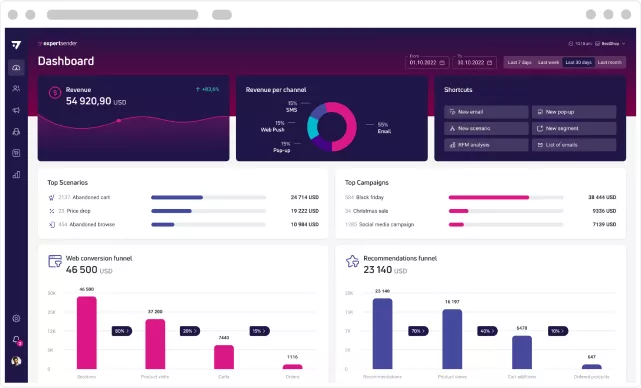
How does the Price Drop scenario work, and how can you make the most of it?

In e-commerce, purchasing decisions are rarely made straight away. Usually, a user looks at a product, compares prices, checks availability, returns a few days later, adds something to their shopping cart, and then… disappears.
This behaviour doesn’t always mean a lack of interest. Often, it’s simply a matter of the right moment, price, or nudge to help them return to the purchase.
This is where the Price Drop scenario comes in. It is one of those automations that can act like a well-calibrated sales radar. Such a scenario monitors user behaviour, analyses product data and reacts when a price change creates a real opportunity for conversion.
For an e-commerce store, this is a way to boost campaign effectiveness and win back customers who were close to making a decision but needed an extra nudge.
What is the Price Drop scenario in e-commerce?
The Price Drop scenario is an automated workflow that you can implement using the Marketing Automation tool. It informs users about a price reduction on a product they were previously interested in. In practice, this means that the system identifies who viewed a given product, added it to their shopping cart or saved it to their wishlist, and then sends a notification when the price drops.
This scenario is not a standard promotional campaign sent to the entire database. It is communication based on purchase intent. Customers receive a message not because the e-commerce site is running a broad marketing campaign, but because a specific product they were interested in now has a more attractive price.
A well-designed Price Drop utilises customer data within a CDP (Customer Data Platform). This makes the communication more personal, up-to-date and contextually relevant. The user does not receive a random promotion, but a specific message: the product you were viewing is now cheaper.
The value of this scenario lies in the timing. If the price drop occurs whilst the user is still considering a purchase, the chances of conversion increase significantly.
What’s important? This solution works across all categories – fashion, electronics, cosmetics, homeware or seasonal products can all benefit from the same logic. The goal? To boost sales on your e-commerce site.
How Price Drop works – step by step
Price Drop works when the system links a user’s interest in a specific product with information about a price drop. In other words: the scenario ‘knows’ who was considering a purchase, monitors the price change and triggers a communication the moment the offer becomes more attractive.
The entire process is data-driven. A marketing automation tool, such as ExpertSender, analyses user behaviour in the web store, utilises product information, checks current availability, and only then decides whether it is worth sending a notification. This ensures that Price Drop does not function as a random promotion, but as a precise response to a specific purchase intention.
In practice, such a scenario may take many conditions into account.
For example: has the user viewed the product in recent days, have they added it to their cart, has the price actually dropped, is the product still available, and has the customer consented to communication via that channel? It is precisely these rules that make the workflow effective, whilst ensuring the recipient is not burdened with unnecessary messages.
A well-designed Price Drop scenario should therefore run in the background but respond very specifically. It does not send a message to everyone. It does not promote every product. It does not trigger at every, even the slightest, price change. Its task is to identify the moment when a price drop can genuinely help the user return to the purchase.
Step 1: The system identifies interest in the product
The first step in the Price Drop scenario is to identify which user was genuinely interested in a specific product. The system does not rely on guesswork, but on behavioural data collected during visits to the e-commerce site.
Such a signal could be, for example, visiting a product page, viewing the same item several times, adding the product to the cart, saving it to a wishlist, or clicking on the product in a previous email campaign. The stronger the signal, the greater the likelihood that the user did not land there by accident, but is genuinely considering a purchase.
This is where a CDP, or Customer Data Platform, is particularly important. It combines information from various sources to build a more complete picture of the customer: what they viewed, when they returned to the shop, which categories interest them, whether they respond to campaigns, and whether they have a purchase history. Thanks to this, the Price Drop scenario can operate not just on the basis of a single visit, but within a broader context.
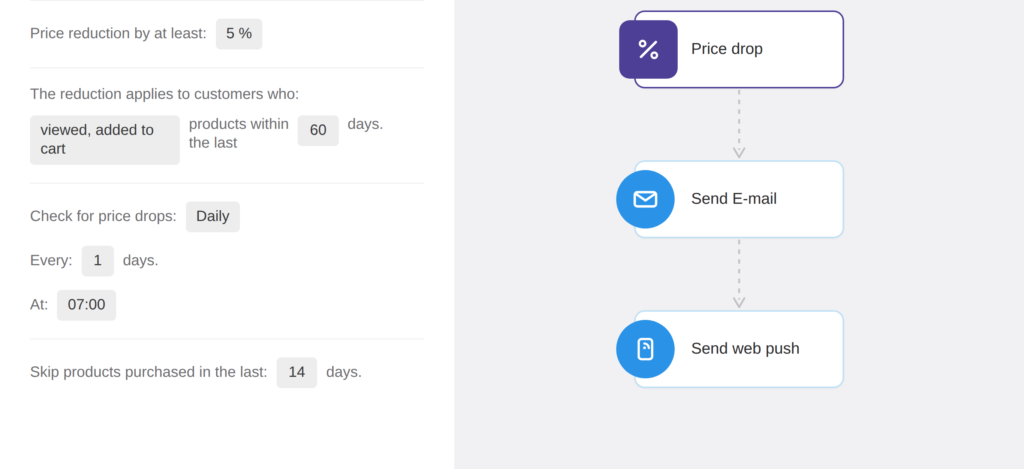
It is also worth remembering that not all behaviour carries the same weight. A user who viewed a random product for a few seconds should not be treated in the same way as a customer who added a product to their shopping cart and returned to it several times. Therefore, a well-configured workflow should distinguish between casual interest and a clear intention to purchase.
It is at this stage that a list of recipients is created, to whom the scenario can return if the product price drops. The better the list is selected, the greater the chances of conversion and the better the quality of communication.
The aim of this step? To find users who are close enough to a purchase decision for information about a lower price to be truly relevant to them.
Step 2: A price drop triggers the workflow
The second step of the Price Drop scenario is to detect the moment when the price of the monitored product actually drops. The system compares the current price with the previous value and checks whether the change meets the conditions set in the scenario.
This is important because not every price reduction should immediately trigger a notification. If the product price changes only slightly, e.g. by a negligible amount or 1%, the notification may not be of real value to the user. Therefore, in a well-designed workflow, it is worth setting a minimum price drop threshold – either as a percentage or a fixed amount.
At this stage, the system can also check additional conditions. Is the product still available? Has the user not purchased it in recent days? Have they not recently received a similar message? Does the price drop apply specifically to the variant they were viewing, e.g. a particular size, colour or model?
This ensures that the Price Drop scenario does not send notifications automatically with every change in the catalogue. It only reacts when the price drop is significant enough.
In practice, it is this stage that determines the quality of the entire automation. If the conditions are too broad, customers may receive too many messages. If they are too narrow, the shop may miss out on conversion opportunities. That is why it is worth finding a balance between effectiveness and the recipient’s comfort.
The aim of this step? To trigger communication only when a price drop is a genuine reason for the user to return to the product and complete the purchase.
See also: 7 mistakes when implementing a Price Drop workflow in e-commerce >>
Step 3: The customer receives an email, SMS or push notification
The third step of the Price Drop scenario is to send the user a notification about the price reduction. The message can be sent via email, SMS or push notification – depending on which marketing consents they have accepted.
It’s worth using a multi-channel approach here, as not every customer responds to communication in the same way. For one person, an email with a product image and a button leading to the shop will be best; for another, a short SMS; and for yet another, a quick push notification.
The most important thing is that the channels do not compete with each other, but complement one another. If the user does not respond to the first message, the scenario can use another channel after a certain period of time. This makes communication more flexible and increases the shop’s chances of the customer returning to the product.
The aim of this step? To reach the user via the right channel at the right moment, before their interest in the purchase wanes completely.
Why do Price Drop scenarios increase conversion?
Price Drop scenarios increase conversion because they target users who have already shown genuine interest in the product. This is not communication aimed at a random audience, but a follow-up to people who were already close to making a purchase decision.
In many cases, a user does not abandon a purchase because they do not like the product. More often, they are held back by the price, a lack of urgency, or a desire to compare the offer with other e-commerce sites. Information about a price drop can then be exactly the nudge they needed to finalise the purchase.
Price Drop works because it shortens the path back to the product. The customer doesn’t have to check for themselves whether the price has changed. They receive a specific message, can quickly go to the product page and make a decision. The less friction along the way, the greater the chances of conversion.
Personalisation is also of great importance. A price drop notification relates to a product the user already knows and has viewed previously, so it is more relevant than a general promotion sent to the entire customer base. Such a message does not look like a random advert, but like practical information that can help the customer make a purchase at a better time.
For an e-commerce store, it’s also a way to make better use of traffic that has already been acquired. Whether the user arrived at the store via an advert, SEO, an email campaign or social media – the Price Drop scenario helps re-engage them without having to start the whole process from scratch.
The result? More returns to products, a greater chance of recovering abandoned carts, and higher sales from users who were already interested in the offer.
How to use Price Drop in omnichannel campaigns?
Price Drop works best when it is part of a broader omnichannel communication strategy, rather than a single message sent via a single channel. This allows you to reach the user where it is easiest to grab their attention: via email, SMS, push notifications or other available communication channels.
In practice, the scenario might start with an email featuring the product, the new price and a button leading directly to the shop. If the user does not respond, the system can trigger another channel after a set period, e.g. a push notification or SMS. However, it is important to do this with tact – omnichannel does not mean bombarding the customer with messages.
A well-designed omnichannel campaign does more than just inform the user of a lower price. It guides the user back to the product in a natural, consistent way that is tailored to their behaviour.
Would you like to implement a Price Drop scenario in your e-commerce business?
We’ll show you how to use Marketing Automation and a CDP to create campaigns that boost sales, win back interested customers and support conversion at various stages of the customer journey.
Summary
The Price Drop scenario is one of those automations that can genuinely boost e-commerce sales, as it addresses a specific user need. This isn’t about a mass promotion, but about well-targeted communication to people who have previously shown interest in the product.
Thanks to data from a CDP platform and a marketing automation tool such as ExpertSender, you can identify purchase intent, monitor price drops and trigger a workflow precisely when the price reduction matters most. This allows you to reach out to customers at the right moment, with a specific message and via the channel where they are most likely to respond.
The best results come from combining Price Drop with multi-channel communication: email, SMS and push notifications can work together to guide the user back to the product. There is just one condition – the scenario must be well-configured, based on up-to-date data, product availability and a reasonable frequency of messages.
Latest Resources
We share our knowledge












-
![]()
Dashboard
-
![]()
Customer Profile 360°
-
![]()
Preference Center
-
![]()
Website personalization
-
![]()
Consents Management
-
![]()
Automated emails
-
![]()
Email Raports
-
![]()
High Deliverability
-
![]()
User real-time tracking
-
![]()
Automated scenarios
-
![]()
RFM analysis
-
![]()
Drag & drop editor
-
![]()
Omnichannel marketing
-
![]()
Recommendation frames
-
![]()
Message checklist
-
![]()
Banners, pop-ups, forms